If you run payroll for a Zambian SME, there's a good chance you do it in Excel. Most of our first customers did. So did we, before we built ZamPay.
Excel is fine — right up until it isn't. Most businesses don't switch because the switch feels harder than the monthly pain. This post is about closing that gap. Here's what moving off Excel actually looks like, in concrete minutes, based on the first businesses who've done it on ZamPay.
What breaks on Excel (eventually)
A payroll on Excel works until one of these happens:
The rates change. NAPSA updated the contribution ceiling in April 2026 — K1,861.80 per side, K37,236 earnings ceiling. Every Excel formula referencing the old K1,708.20 figure now overstates compliance and understates penalties. Whoever set up the formulas has to remember to update them, in every workbook, every time ZRA or NAPSA publishes a new circular.
A file gets corrupted. Excel silently reformats CSV files when you open them — strips leading zeros from NRC numbers, changes decimal precision on contribution amounts. Save the file, upload to ZRA TaxOnline or NAPSA iCare, get rejected. The portal doesn't tell you why. You spend an hour finding the difference.
Audit trail disappears. Someone changed Mwape's allowance in February. Excel doesn't remember who, or when, or why. When ZRA asks for records during an audit, you're reconstructing from email chains.
Version chaos sets in. payroll_january_v2_final.xlsx. payroll_january_FINAL_v3.xlsx. payroll_january_actual_final.xlsx. Which one did you file from? Hope it was the right one.
The 10th-of-the-month deadline compounds. PAYE on ZRA TaxOnline. NAPSA on iCare. NHIMA on its own portal. Three different file formats. Three different ways things can go wrong. All due by the 10th. Miss it and the penalties start running.
None of these are theoretical. Every Zambian payroll professional has lived all five.
What Zambian payroll looks like on ZamPay
The most common question we hear is "how long will this take me?" The honest answer is under 20 minutes to set up, then under 45 minutes a month. Here are the six things you'll do on ZamPay — from your first day to your monthly rhythm.
Step 1 — Dashboard: set up your company (~5 min, one-time)
When you sign up at zampay.biz with your email and click the magic link, you land on the Dashboard. First task: tell ZamPay about your company.
- Company / trading name — as registered with PACRA
- ZRA TPIN — your 10-digit Tax Payer Identification Number (required for ZRA P11 filing)
- NAPSA Employer Registration Number — from your NAPSA iCare account
- NHIMA Employer Number — from your NHIMA employer portal
Don't have one yet? You can add it later — you won't be blocked from running payroll, but the exports for that statutory won't generate cleanly until the number is set.
Once your company is set up, the Dashboard becomes your monthly home screen — Compliance Health Score, next-deadline countdown, PAYE / NAPSA / NHIMA amounts due, last payroll summary. One glance tells you where you stand.
Step 2 — Add your employees (~10 min, one-time + new hires monthly)
Two paths. Pick whichever fits your team size.
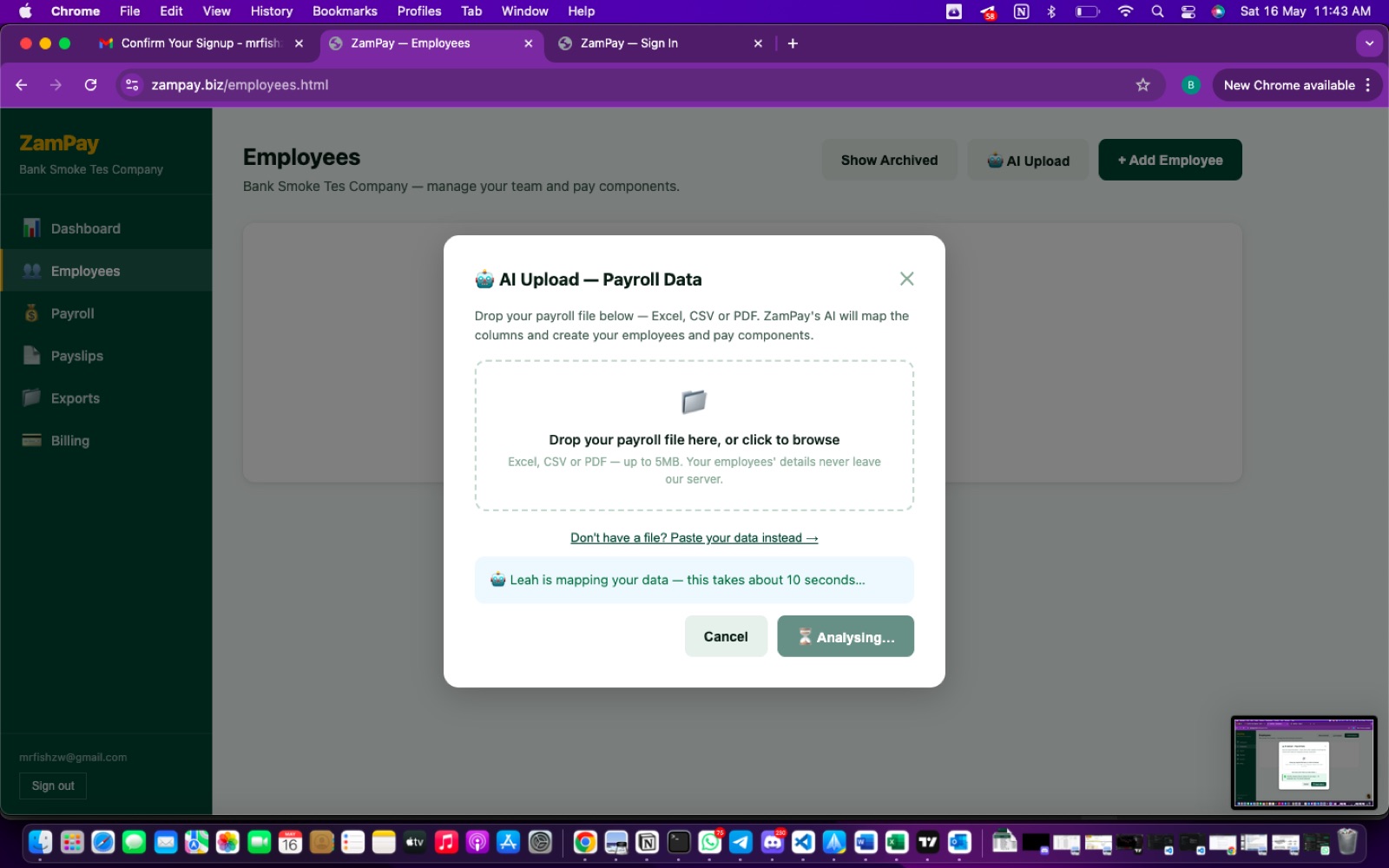
Bulk upload (recommended for 5+ employees) — On the Employees page, click AI Upload. Drop your existing payroll file straight in — Excel, CSV, or PDF, no conversion needed. Leah — our AI compliance advisor — parses the file and maps your columns to ZamPay's structure in about 10 seconds.
She handles the things that would take you an hour manually:
- Auto-splits full names into surname / first / middle (with a review step for low-confidence cases)
- Detects your basic salary, allowance, and overtime columns
- Recognises statutory ID columns (NRC, TPIN, NAPSA number, NHIMA number)
- Flags any rows that look like totals or subtotals rather than employees
- Surfaces any columns she didn't recognise — you can map them manually in 30 seconds each
Nothing is committed until you click Import on the review screen — you can see exactly what will be created before it is.
One at a time (recommended for small teams or new hires) — Click + Add Employee and fill in the form. Surname, first name, NRC, TPIN, NAPSA / NHIMA member numbers, salary, allowances. About a minute per employee.
You only do this once for your existing team. After that, you add new hires one at a time as they join.
Step 3 — Run payroll (~10 min, every month)
From the Payroll tab, click New payroll run and pick the month. ZamPay pulls every active employee, calculates gross, PAYE, NAPSA, NHIMA, and SDL according to current Zambian rules, and shows you a per-employee breakdown.
Review the numbers. If anything looks off, click into the employee, adjust, and the calculation updates immediately. When you're satisfied, hit Approve and lock. The run becomes final and creates an immutable audit record.

Step 4 — Download payslips (~2 min, every month)
From the Payslips tab, ZamPay has already generated a branded PDF payslip for every employee in the locked run. Download all at once as a ZIP, or email them in bulk to your staff with one click. Payslips include the fields you toggled on during setup — YTD totals, employer contributions, NRC, TPIN, all configurable.
Step 5 — Download and lodge statutory returns (~10 min, by the 10th)
From the Exports tab, three portal-ready downloads waiting for you:
- ZRA P11 XLSX → upload to ZRA TaxOnline
- NAPSA Schedule 1 CSV → upload to NAPSA iCare
- NHIMA Monthly CSV → upload to NHIMA portal
Download. Upload to each portal in the exact format it expects. Done by the 10th of the month, every month. No reformatting, no column-mapping, no portal rejection mysteries.
Important: download each file and upload it directly to the portal. Don't open in Excel first — Excel silently reformats CSVs and is the most common cause of portal rejections that aren't real bugs.
Step 6 — Pay your subscription (~30 seconds, every month)
From the Billing tab, pay by mobile money (MTN, Airtel, or Zamtel — instant) or bank transfer to FNB (~1 business day).
If you're on Free Forever (5 or fewer employees), skip this step — there's nothing to pay. If you're on Lite, Growth, Business, or Bespoke, you can also pay annually and get 2 months free.
Setup total: under 20 minutes. Steps 1 and 2 — company info plus your team loaded.
Monthly total thereafter: under 45 minutes. Steps 3–6, every month.
The 10th-of-the-month deadline stops being a thing.

Real businesses who've made the switch
Esther Sakala — Unistudy Zambia Limited
Esther is HR Manager at Unistudy Zambia (our own parent company). She used ZamPay end-to-end during the pre-launch testing window in early May and became our first paying customer. Her feedback was simple — registering employees, running payroll, and generating payslips all worked without issue. What surprised her most was how familiar the workflow felt — the same steps she'd always done, without the spreadsheet anxiety.

Multivent
Kennedy at Multivent ran real April 2026 payroll on ZamPay during our dogfood window. In doing so, he found two compliance edge cases we'd missed — NHIMA calculated on full gross instead of basic salary, and a whole-Kwacha rounding inconsistency on PAYE. We shipped fixes within 24 hours, verified against NAPSA's and NHIMA's portal formats, and Kennedy ran his second payroll the following month without incident.
This is partly why ZamPay shipped late on Friday and not Wednesday. It's also why we'll keep saying: ZamPay was built with feedback from real Zambian businesses already running payroll on it, not in a lab.
What if your data is messy?
Some businesses have clean Excel sheets. Others have inherited workbooks from previous accountants with formulas that haven't been touched in three years, employees listed twice under different spellings of the same name, and pay components nobody remembers creating.
If that's you, two options:
Option 1 — Run AI Upload anyway. Leah will flag the duplicates and the unmappable columns. Most people clean up in the review screen before importing. Total cleanup time: usually 30–60 minutes.
Option 2 — Let us migrate you, free. If your records are tangled or you'd rather hand it off, our team will do the migration for you — data cleanup, employee onboarding, first-run handholding, and a walkthrough call when it's done. No charge. Email info@zampay.biz and we'll start.
Where to start
Two low-friction places:
Run a free Payroll Health Check. Paste your current payroll data and get a scored compliance report — takes 30 seconds, no signup, no card. We'll tell you what ZamPay would have caught. zampay.biz/payroll-check
Or sign up and try it directly. Free Forever tier covers up to 5 employees indefinitely — no card needed. Paid tiers start at K299/month for 6–20 employees, with Leah included. zampay.biz
Or WhatsApp us at +260 573918484 with your questions first. We read every message.
— The ZamPay team
Unistudy Zambia Limited